> ## Documentation Index
> Fetch the complete documentation index at: https://doc-test-my.mintlify.site/llms.txt
> Use this file to discover all available pages before exploring further.
# Test and Live Modes
> Check the Test (sandbox environment) and Live modes available on the Razorpay Dashboard and the difference between them.
**Watch Out!**
The Dashboard offers two modes: **Test** and **Live**. Both modes provide the same functionalities, except that real payments cannot be accepted in **Test** mode. Refer the [table below](/docs/payments/dashboard/test-live-modes#test-mode-vs-live-mode) for more details.
## Test Mode Vs Live Mode
| Test Mode | Live Mode |
| ------------------------------------------------------------------------------------------------------------------------------------------------------------------------------------------------------------ | ----------------------------------------------------------------------------------------------------------------------- |
| The Test mode is a replica of your account in a sandbox environment. This allows you to test all aspects of your integration before you go live. | After thoroughly testing your integration, you can switch to the Live mode and start accepting payments from customers. |
| The Test mode is available to you as soon as you complete the sign-up process. You can use Test mode as long as you want. | The Live mode is available after you activate your account from the Dashboard. |
| Generate API keys in Test mode to use the API keys in Test mode. | Generate API keys in Live mode to use the API keys in Live mode. |
| Actions taken in the test mode have no consequences in your live environment. Transactions and entities created in the test mode do not appear in the live mode. **No real money is used in the test mode**. | Payments made by your customers are settled to your account according to your settlement cycle. |
**Separate Set of API Keys in Test and Live Mode**
You have to generate a separate set of API keys for Live and Test modes. Know more about [Generating API Keys on Dashboard](/docs/payments/dashboard/account-settings/api-keys).
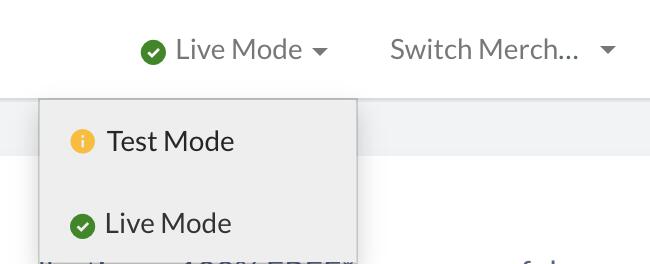
## Switch Between Test and Live Modes
You can switch between the Test and Live modes using the drop-down option at the top of the Dashboard.