> ## Documentation Index
> Fetch the complete documentation index at: https://doc-test-my.mintlify.site/llms.txt
> Use this file to discover all available pages before exploring further.
# About Payment Gateway
> Accept payments using Razorpay Payment Gateway. Discover its advantages, when to use it and the various integration types.
A Payment Gateway creates a secure pathway between a customer and the business to facilitate payments securely. It involves the authentication of both parties from the banks involved. You can accept payments from customers on your website and mobile apps using the Razorpay Payment Gateway as a business owner.
* **Onboarding**: Integrate Razorpay Curlec Payment Gateway on your native-built website using Standard Checkout. You can also explore Razorpay Curlec plugins for various platforms such as **WooCommerce**, **WordPress**, **Shopify** and more.
* **Success Rate**: Achieve a higher success rate by using **multiple connections** to route a transaction. Razorpay Curlec also provides **downtime updates** and more.
* **Refunds**: Razorpay Curlec retries failed API refunds smartly based on the **error code** received from the bank. **Instant refunds** provides a best-in-class refund experience to your customers.
* **Scalability and Availability**: Razorpay systems can handle a load of **800 transaction requests per second** without deterioration. They also provide downtime updates via email, status page and Dashboard.
* **Settlements Reconciliation**: Use settlement reconciliation to keep **track** of all the transactions such as payments, refunds, transfers, and adjustments settled to you for a particular day or month.
* **Coverage**: Razorpay supports a wide range of **domestic and international cards** and **wallets**.
## When to Use a Payment Gateway
You should consider integrating with a payment gateway if you have a **website** or a **mobile app**.
You can still accept payments by using other Razorpay products such as [Payment Links](/docs/payments/payment-links) and [Payment Pages](/docs/payments/payment-pages). Check the list of [no-code apps](/docs/payments#i-do-not-have-a-website-or-mobile) and find the product that best suits your business needs.
If you are unsure about integrating with Razorpay Gateway, you can use [Razorpay Payment Button](/docs/payments/payment-button). Embed a Payment Button on your website by just adding a couple of lines of code.
## Types of Checkout
Use this flow to decide whether to use Standard or Custom Checkout. You can also explore other available checkout options.
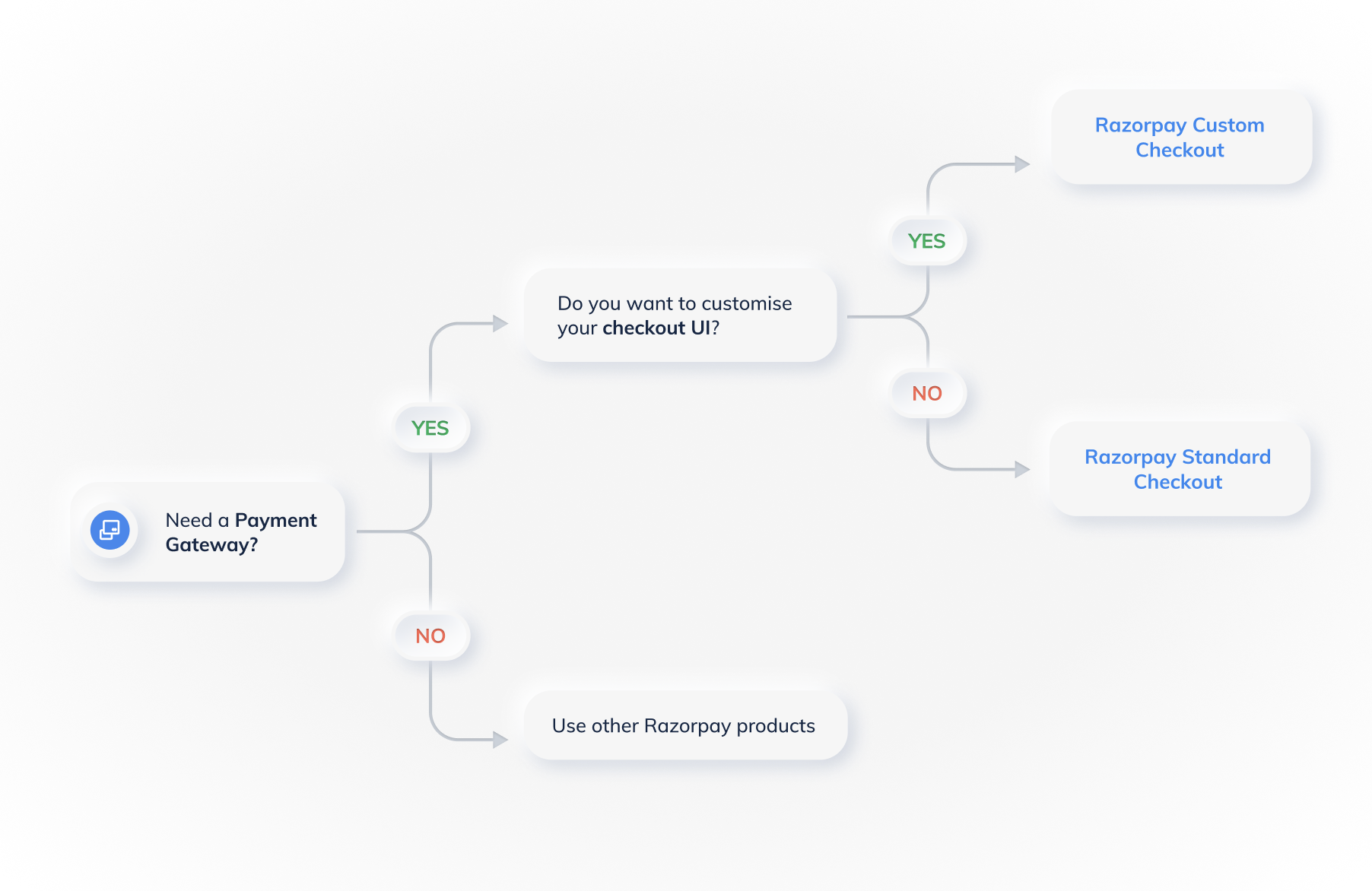 * Customise the **Pay** button to fit your business needs using JavaScript-based method.
* Offers additional functions to automatically open and close the Checkout.
Know more about [Standard Checkout](/docs/payments/payment-gateway/web-integration/standard).
* Ideal if you want to fully customise your checkout UI.
* Design the entire payment flow the way you want.
Know more about [Custom Checkout](/docs/payments/payment-gateway/web-integration/custom).
* Use Server-to-Server (S2S) integration to communicate directly with the Razorpay servers and seamlessly integrate the service in your web application.
* Capture payment details and process them on your server.
* Complete control over the checkout design and payment experience.
* For S2S integration, contact the [Support team](https://razorpay.com/support/).
If you prefer not to use a Payment Gateway, explore other [Razorpay Products](/docs/payments#accept-payments) that align with your business needs.
## Integrate Payment Gateway - Web, Mobile, Ecommerce Plugins
Razorpay offers a wide range of integrations as given below:
* [Razorpay Standard Checkout](/docs/payments/payment-gateway/web-integration/standard)
* [Razorpay Custom Checkout](/docs/payments/payment-gateway/web-integration/custom)
* [PHP](/docs/payments/server-integration/php)
* [Ruby](/docs/payments/server-integration/ruby)
* [Python](/docs/payments/server-integration/python)
* [Node.js](/docs/payments/server-integration/nodejs)
* [.NET](/docs/payments/server-integration/dot-net)
* [Java](/docs/payments/server-integration/java)
* [Go](/docs/payments/server-integration/go)
* [Arastta Integration](/docs/payments/payment-gateway/ecommerce-plugins/arastta)
* [CS-Cart Integration](/docs/payments/payment-gateway/ecommerce-plugins/cs-cart)
* [Easy Digital Download Integration](/docs/payments/payment-gateway/ecommerce-plugins/easy-digital-downloads)
* [Magento Integration](/docs/payments/payment-gateway/ecommerce-plugins/magento)
* [OpenCart Integration](/docs/payments/payment-gateway/ecommerce-plugins/open-cart)
* [PrestaShop Integration](/docs/payments/payment-gateway/ecommerce-plugins/prestashop)
* [Shopify Integration](/docs/payments/payment-gateway/ecommerce-plugins/shopify-razorpay-secure)
* [WHMCS Integration](/docs/payments/payment-gateway/ecommerce-plugins/whmcs)
* [Wix Integration](/docs/payments/payment-gateway/ecommerce-plugins/wix)
* [WooCommerce Integration](/docs/payments/payment-gateway/ecommerce-plugins/woocommerce)
* [WordPress Integration](/docs/payments/payment-gateway/ecommerce-plugins/wordpress)
* [Android SDK](/docs/payments/payment-gateway/android-integration/standard)
* [iOS SDK](/docs/payments/payment-gateway/ios-integration/standard)
* [React Native SDK](/docs/payments/payment-gateway/react-native-integration/standard)
* [Flutter SDK](/docs/payments/payment-gateway/flutter-integration/standard)
### Related Information
* [How Payment Gateway works](/docs/payments/payment-gateway/how-it-works)
* [Features](/docs/payments/payment-gateway/features)
* Customise the **Pay** button to fit your business needs using JavaScript-based method.
* Offers additional functions to automatically open and close the Checkout.
Know more about [Standard Checkout](/docs/payments/payment-gateway/web-integration/standard).
* Ideal if you want to fully customise your checkout UI.
* Design the entire payment flow the way you want.
Know more about [Custom Checkout](/docs/payments/payment-gateway/web-integration/custom).
* Use Server-to-Server (S2S) integration to communicate directly with the Razorpay servers and seamlessly integrate the service in your web application.
* Capture payment details and process them on your server.
* Complete control over the checkout design and payment experience.
* For S2S integration, contact the [Support team](https://razorpay.com/support/).
If you prefer not to use a Payment Gateway, explore other [Razorpay Products](/docs/payments#accept-payments) that align with your business needs.
## Integrate Payment Gateway - Web, Mobile, Ecommerce Plugins
Razorpay offers a wide range of integrations as given below:
* [Razorpay Standard Checkout](/docs/payments/payment-gateway/web-integration/standard)
* [Razorpay Custom Checkout](/docs/payments/payment-gateway/web-integration/custom)
* [PHP](/docs/payments/server-integration/php)
* [Ruby](/docs/payments/server-integration/ruby)
* [Python](/docs/payments/server-integration/python)
* [Node.js](/docs/payments/server-integration/nodejs)
* [.NET](/docs/payments/server-integration/dot-net)
* [Java](/docs/payments/server-integration/java)
* [Go](/docs/payments/server-integration/go)
* [Arastta Integration](/docs/payments/payment-gateway/ecommerce-plugins/arastta)
* [CS-Cart Integration](/docs/payments/payment-gateway/ecommerce-plugins/cs-cart)
* [Easy Digital Download Integration](/docs/payments/payment-gateway/ecommerce-plugins/easy-digital-downloads)
* [Magento Integration](/docs/payments/payment-gateway/ecommerce-plugins/magento)
* [OpenCart Integration](/docs/payments/payment-gateway/ecommerce-plugins/open-cart)
* [PrestaShop Integration](/docs/payments/payment-gateway/ecommerce-plugins/prestashop)
* [Shopify Integration](/docs/payments/payment-gateway/ecommerce-plugins/shopify-razorpay-secure)
* [WHMCS Integration](/docs/payments/payment-gateway/ecommerce-plugins/whmcs)
* [Wix Integration](/docs/payments/payment-gateway/ecommerce-plugins/wix)
* [WooCommerce Integration](/docs/payments/payment-gateway/ecommerce-plugins/woocommerce)
* [WordPress Integration](/docs/payments/payment-gateway/ecommerce-plugins/wordpress)
* [Android SDK](/docs/payments/payment-gateway/android-integration/standard)
* [iOS SDK](/docs/payments/payment-gateway/ios-integration/standard)
* [React Native SDK](/docs/payments/payment-gateway/react-native-integration/standard)
* [Flutter SDK](/docs/payments/payment-gateway/flutter-integration/standard)
### Related Information
* [How Payment Gateway works](/docs/payments/payment-gateway/how-it-works)
* [Features](/docs/payments/payment-gateway/features)