> ## Documentation Index
> Fetch the complete documentation index at: https://doc-test-my.mintlify.site/llms.txt
> Use this file to discover all available pages before exploring further.
# About Dashboard
> Overview of the Razorpay Dashboard home page with key features including payments overview, insights, and product recommendations for managing your payment operations.
The Dashboard Home page serves as your central command center for managing payment operations on Razorpay. It provides a comprehensive overview of your account status, recent payment activity, key insights and personalised product recommendations to help you optimise your payment infrastructure.
The Dashboard offers a wide range of features, such as:
* **Analytics** and **real-time charts** that provide valuable insight into your business performance.
* List of **recent activities** that may require your action.
* **Configure, operate, and manage** your Payment Gateway (PG) account and other Razorpay products.
* An overview of recent **payments, settlements and refunds**.
 **Handy Tips**
You must have a Razorpay Curlec account to access the Dashboard. Do not have a Razorpay Curlec account? [Sign up with Razorpay Curlec](https://curlec.com/onboarding/my/?).
## Key Section of Payments Dashboard Home Page
The following information is shown on the Payments Dashboard Home page.
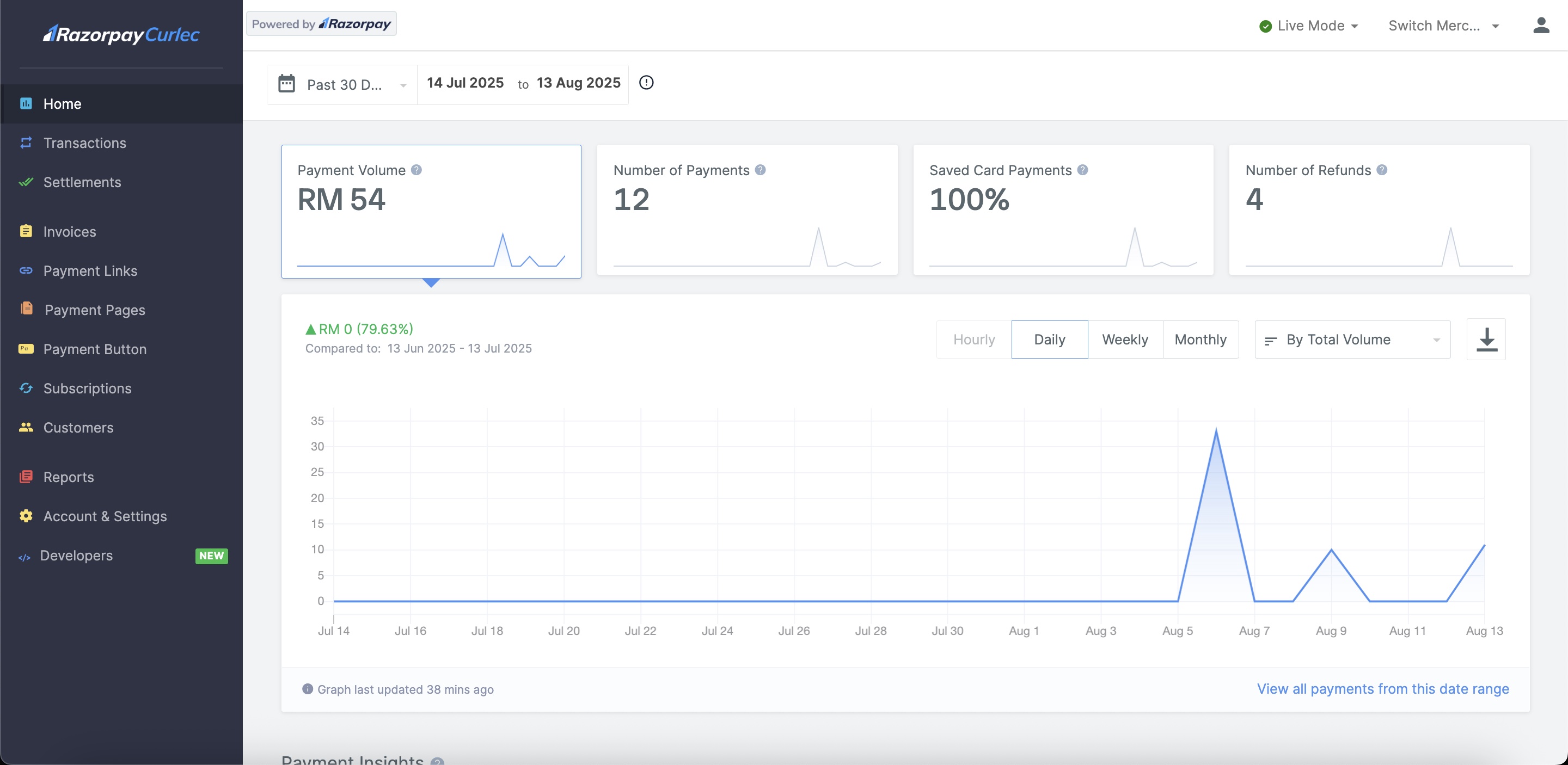
Your current account balance is displayed on the Dashboard. Payment Overview data provides an overview of the total collected amount in you current balance, total number of **Refunds** made and the total number of Orders created by your customers for the selected time range.
Payment Volume data provides an overview of the Payment Volume and Number of Payments received for the selected date range.
You can view detailed information about your account activities. This includes a wide range of analytics and real-time charts that provide insight into the performance of your business and help you take informed actions if necessary.
You can view the following information:
* Successful and failed payment count.
* Successful and failed refund count.
* Filter data to display it on a Daily, Weekly or Monthly basis.
* Group data by Payment Methods.
* Hover over the pie diagram to view the amount split for each payment method.
* **Payment method split** data displays the distribution of various payment methods for collected payments for the selected duration.
This section displays recent Payment related activities. Click the respective payment id for more information about the transaction.
## Key Tabs of Payments Dashboard
Following are the key tabs of the Payments Dashboard.
Given below are the tabs and supported actions under Transactions:
| Tab | Actions |
| -------- | ------------------------------------------------------------------------------------------------------------------------------------------------------------------------------------------------------------------------------------------------------------- |
| Payments | |
| Orders | [View details of an order](/docs/payments/orders/dashboard#view-order-details) |
Given below are the actions supported for Reports:
* [Download a Report](/docs/payments/dashboard/reports#download-reports)
* [Increase report generation limit](/docs/payments/dashboard/reports#limit-on-reports)
Given below are the sections and actions supported under Account & Settings:
| Tabs and Actions |
| ---------------------------------------------------------------------------------------------------------------------------------------------------------------------------------------------------------------------------------------------------------------------------------------------------------------------------------------------------------------------------------------------------------------------------------------------------------------------------------------------------------------------------------------------------------------------------------------------------------------------------------------------------------------------------------------------------------------------------------------------------------------------------------------------------------------------------------------------- |
| **Website and app settings**
**Handy Tips**
You must have a Razorpay Curlec account to access the Dashboard. Do not have a Razorpay Curlec account? [Sign up with Razorpay Curlec](https://curlec.com/onboarding/my/?).
## Key Section of Payments Dashboard Home Page
The following information is shown on the Payments Dashboard Home page.
Your current account balance is displayed on the Dashboard. Payment Overview data provides an overview of the total collected amount in you current balance, total number of **Refunds** made and the total number of Orders created by your customers for the selected time range.
Payment Volume data provides an overview of the Payment Volume and Number of Payments received for the selected date range.
You can view detailed information about your account activities. This includes a wide range of analytics and real-time charts that provide insight into the performance of your business and help you take informed actions if necessary.
You can view the following information:
* Successful and failed payment count.
* Successful and failed refund count.
* Filter data to display it on a Daily, Weekly or Monthly basis.
* Group data by Payment Methods.
* Hover over the pie diagram to view the amount split for each payment method.
* **Payment method split** data displays the distribution of various payment methods for collected payments for the selected duration.
This section displays recent Payment related activities. Click the respective payment id for more information about the transaction.
## Key Tabs of Payments Dashboard
Following are the key tabs of the Payments Dashboard.
Given below are the tabs and supported actions under Transactions:
| Tab | Actions |
| -------- | ------------------------------------------------------------------------------------------------------------------------------------------------------------------------------------------------------------------------------------------------------------- |
| Payments | |
| Orders | [View details of an order](/docs/payments/orders/dashboard#view-order-details) |
Given below are the actions supported for Reports:
* [Download a Report](/docs/payments/dashboard/reports#download-reports)
* [Increase report generation limit](/docs/payments/dashboard/reports#limit-on-reports)
Given below are the sections and actions supported under Account & Settings:
| Tabs and Actions |
| ---------------------------------------------------------------------------------------------------------------------------------------------------------------------------------------------------------------------------------------------------------------------------------------------------------------------------------------------------------------------------------------------------------------------------------------------------------------------------------------------------------------------------------------------------------------------------------------------------------------------------------------------------------------------------------------------------------------------------------------------------------------------------------------------------------------------------------------------- |
| **Website and app settings**
|
| **Business settings**
|
| **Payments and refunds**
|
| **Bank accounts and settlements**
|
| **Notification Settings**
|
| **Checkout Settings**
|
| **International Payment Settings**
|
| **Payment Methods**
|
Given below are the payments products and supported actions:
| Product | Action |
| -------------- | ---------------------------------------------------------------------- |
| Invoices | [Create and manage Invoices](/docs/payments/invoices/create) |
| Payment Button | [Create and manage Payment Button](/docs/payments/payment-button) |
| Payment Pages | [Create and manage Payment Page](/docs/payments/payment-pages/create) |
| Payment Links | [Create and manage Payment Links](/docs/payments/payment-links/create) |
Given below are the actions supported for Customers:
* [Create a Customer](/docs/payments/customers#create-a-customer)
* [Edit Customer Details](/docs/payments/customers#edit-customer-details)